
Free invoice generator: create and send PDF invoices
How DIVERD Invoicing works, what the free plan really includes, and why tracking what you are owed matters more than making the invoice.
Every freelancer and small business hits the same wall in the first month: you have done the work, and now you have to ask to be paid for it. Most people reach for a word processor, and a year later they are hunting through a folder for which document had which number on it.
DIVERD Invoicing Studio is the tool built to stop doing that. It is a free invoice generator in the honest sense of the phrase: you can create an account, issue an invoice and download the PDF without paying anything or entering a card.
Who this is actually for
- Freelancers and sole traders billing a handful of clients a month, who need the numbering to be right and the totals to add up.
- Small businesses in Bosnia and Herzegovina, invoicing in convertible marks and in euro, to clients at home and abroad.
- Anyone with an accountant who keeps asking for the same export in the same format every quarter.
- People who invoice occasionally — a few a month — and do not want a subscription for the privilege.
What you get without paying
The free tier is a real tier, not a trial that expires:
- Create an invoice free — two issued invoices a month, one client on file.
- PDF invoice, downloaded straight from the browser. It carries a small watermark on the free plan; the numbers, the tax lines and the layout are the same document a paid account produces.
- Unlimited drafts. Drafts do not count against the monthly two, so you can build one up over a week and only issue it when it is right.
- Both languages and both currencies, with the tax handled properly rather than as a percentage you type in yourself.
Can you send an invoice for free?
Half the answer is yes, and it is worth being straight about which half.
You can download the PDF on the free plan and attach it to your own email — that costs nothing and it is what most people do. What the free plan does not include is sending from inside the app: hitting one button and having the invoice go out, tracked, with automatic payment reminders when it goes past due. That is a paid feature, and it is the one people upgrade for, because chasing late payers by hand is the part of invoicing everyone hates.
So: send invoice free — yes, by downloading and sending it yourself. Sending and chasing automatically is what you pay for.
Easy to track, which is the actual point
Making one invoice is easy in any tool. Knowing where you stand across thirty of them is not, and that is what a spreadsheet stops doing well around month four.
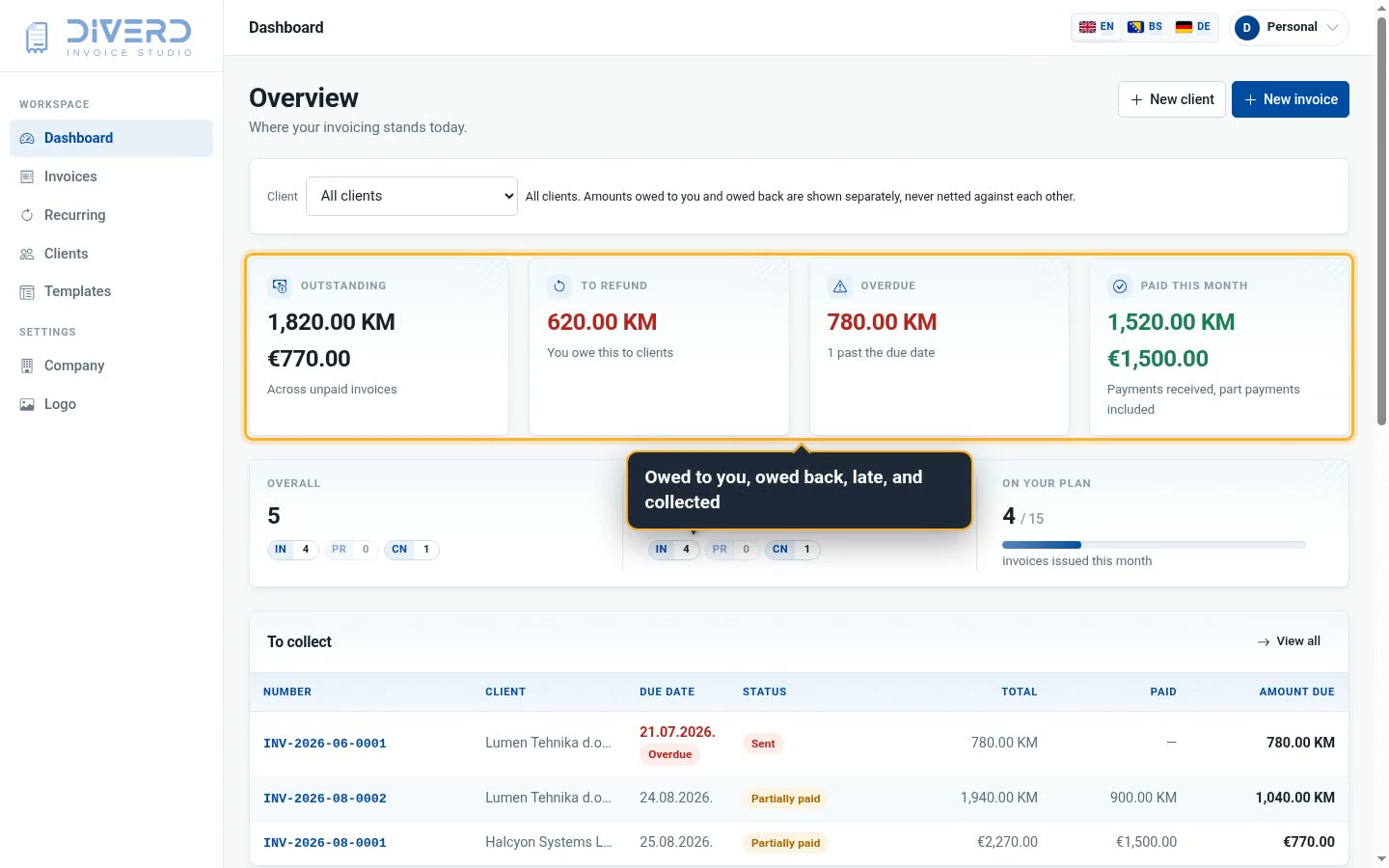
The dashboard answers the four questions that matter, on one screen:
- Outstanding — what is owed to you, across every unpaid invoice.
- Overdue — what is past its due date, counted separately, because those are the ones that need a phone call.
- Paid this month — including part payments, so a half-settled invoice is not filed as unpaid.
- To refund — what you owe back, never netted against what you are owed. Two directions of money are two numbers.
Underneath that is the list of what to collect, sorted by how late it is. Part payments are recorded against the invoice rather than replacing the total, so "1,940.00 KM, 900.00 KM paid, 1,040.00 KM due" stays legible a year later.
The things that go wrong with invoices
A few details that sound boring and are the whole job:
- Numbering that cannot repeat. Invoice numbers are issued in sequence and restart each month; the app will not hand out the same one twice, even if two tabs are open.
- Totals computed once. Line items, discounts, tax and the total are calculated in one place, so the PDF cannot disagree with the list.
- Nothing lost on a refresh. An invoice is a database row from the moment you start it, not a form waiting to be submitted.
- A PDF that looks like an accountant made it — page breaks in the right places, the tax summary where a bookkeeper expects it.
Try it
Making a PDF invoice free takes about two minutes: create an account, add a client, add a line, download. If it does not suit you, nothing has been spent.
And if it nearly suits you but you need something changed — a field, a template, an export in your accountant's format — that is ordinary work here, and the reply comes from the people who wrote the app rather than from a support queue.
Open DIVERD Invoicing or book a walk-through and we will walk through the parts that matter for how you bill.